
Clean hidden metadata before you share
Inspect what is embedded in your photos and documents, remove what you choose, and export a clean copy — 100% offline on iPhone and Mac, no account, one-time purchase.


Free to try · iPhone $9.99 · Mac $19.99 one-time
Check your photo now — free
Drop an image below to see exactly what metadata it carries. Runs entirely in your browser — no upload required.
Drop an image here or click to browse
JPEG, PNG, WebP — up to 25 MB. Processed entirely in your browser.
🔒 Your files never leave your browser. All processing happens locally — no server uploads, no tracking.
What EXIF metadata is and what it typically contains
EXIF (Exchangeable Image File Format) is a standard for embedding technical information about a photo inside the image file itself. It was originally designed to help photographers manage large batches of images by storing exposure settings alongside the pixel data. Today, every smartphone and digital camera writes EXIF automatically.
A typical EXIF block in a photo contains:
- Camera make and model — "Apple iPhone 15 Pro", "Sony ILCE-7M4", "Canon EOS R6". This fingerprints the device even if you do not identify yourself in the photo.
- Exposure settings — shutter speed, aperture, ISO, focal length, flash mode. Useful for photographers reviewing their technique; potentially identifying for others.
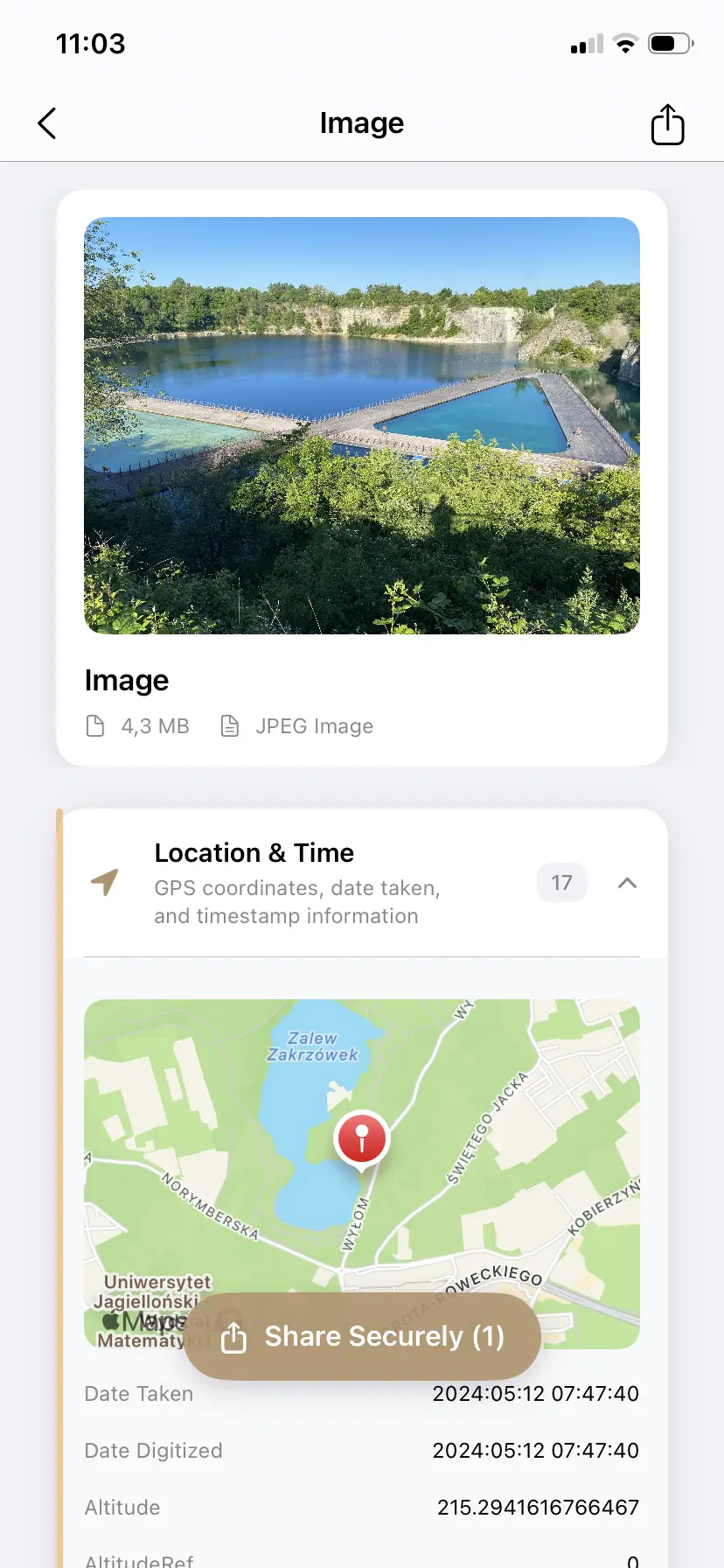
- GPS coordinates — latitude and longitude, sometimes altitude. When location services are on, every photo contains the precise location where it was taken. This is typically accurate to a few meters.
- Timestamp — date and time the photo was taken, including timezone in modern devices.
- Software — which app or firmware was used to capture or process the image.
Why most people never see it
The "Get Info" panel on Mac and "Properties" on Windows show a small subset of EXIF data — typically dimensions, file size, and maybe the camera model. They do not show GPS coordinates, full EXIF, XMP, or any of the newer metadata categories like C2PA content credentials.
Apple's Photos app lets you see the location in a small map view, but only if you know to look. It does not show camera fingerprint details, AI metadata, or any of the XMP fields. Most people share photos without ever having inspected this data.
What additional metadata modern tools add
Beyond EXIF, modern images can carry several other types of embedded data:
- XMP (Extensible Metadata Platform) — Adobe's XML-based metadata standard. Stores editing history, copyright information, keywords, ratings, and — increasingly — AI tool usage. Many editing apps write XMP.
- IPTC fields — originally for news wire photo attribution. Contains author, copyright, caption, keywords, and the Digital Source Type field that indicates AI generation.
- C2PA content credentials — cryptographically signed manifests written by AI tools like ChatGPT/DALL-E, Adobe Firefly, and Microsoft Designer. Not visible in any standard viewer — requires a tool that specifically reads JUMBF or caBX binary structures.
- PNG tEXt chunks — plaintext blocks in PNG files. Stable Diffusion tools write the full generation prompt, model name, and settings here. Invisible in standard viewers but fully readable by anyone with the right tool.
- Color profiles — embedded ICC color space data. Not a privacy concern but affects how images are displayed across devices.
How to check on iPhone and Mac
PrivyClean groups all of this into a single view organized by category, so you can quickly scan what each file contains:
- On iPhone or iPad: select a photo in the Files app or Photos app and tap Share, then choose PrivyClean from the share sheet. Or open PrivyClean directly and import the file.
- On Mac: right-click any image file in Finder and select PrivyClean from the Quick Actions menu. Or drag files directly into the app.
PrivyClean shows each metadata category with a risk indicator: GPS and AI metadata are flagged as higher risk because they reveal location or content provenance. Camera info and timestamps are lower risk but still visible. You can review, then decide which categories to clean before exporting.
What each metadata category means in practical terms
- GPS location — the most significant privacy risk. If present, anyone who downloads the file can see exactly where the photo was taken, down to a street address. Photos taken at home, at work, or at a regular routine location are particularly sensitive. See our guide to removing location from photos.
- Camera model and serial — fingerprints your specific device. Combined with other photos you have shared, this can link images together even if you post them from different accounts. See our guide to removing camera info.
- AI metadata (C2PA, IPTC AI source) — triggers automatic AI labels on Instagram, TikTok, Pinterest, and LinkedIn. Can cause false positives for real photographs edited with AI tools. See our guide to checking AI metadata.
- Author and copyright — names, email addresses, and copyright statements written by editing software. May contain personal identifying information.
- Editing software and history — records which applications processed the file. Not usually a privacy concern but reveals your software stack.
Why checking beats guessing
A common mistake is assuming that a file "probably doesn't have GPS" or "probably doesn't have AI metadata" without checking. Location metadata depends on whether location services were enabled at the moment the photo was taken — which can vary by app and device settings, and can be on for years without the user noticing.
AI metadata depends on which editing tools were used and whether they were configured to embed credentials. Photoshop can embed or not embed depending on settings that are often set once and forgotten.
Checking takes less than a minute. It gives you a definitive answer rather than an assumption. And it shows you exactly what would be removed if you choose to clean — no surprises.