
Clean hidden metadata before you share
Inspect what is embedded in your photos and documents, remove what you choose, and export a clean copy — 100% offline on iPhone and Mac, no account, one-time purchase.


Free to try · iPhone $9.99 · Mac $19.99 one-time
What they have in common
Both tools share the same core principle: process files locally, without uploading to a cloud service. Both are genuinely useful for removing EXIF metadata from images before sharing. Both handle batch operations. If your only goal is to strip standard EXIF from JPEG files, either will do the job.
ExifCleaner: what it does well
ExifCleaner is a free, open-source desktop application built on Electron. It runs on Windows, macOS, and Linux. You drag files onto the window and it removes EXIF, XMP, and IPTC metadata — no configuration needed.
Its strengths:
- Free and open source — the full source code is auditable on GitHub. If trust comes from transparency, ExifCleaner offers that.
- Windows and Linux support — runs anywhere Electron runs. PrivyClean is Apple platforms only.
- Simple interface — drag files, done. No decisions required.
- Video file support — can strip metadata from video files in addition to images, using ExifTool under the hood.
- Before/after diff view — shows which fields were removed after cleaning.
PrivyClean: what it does differently
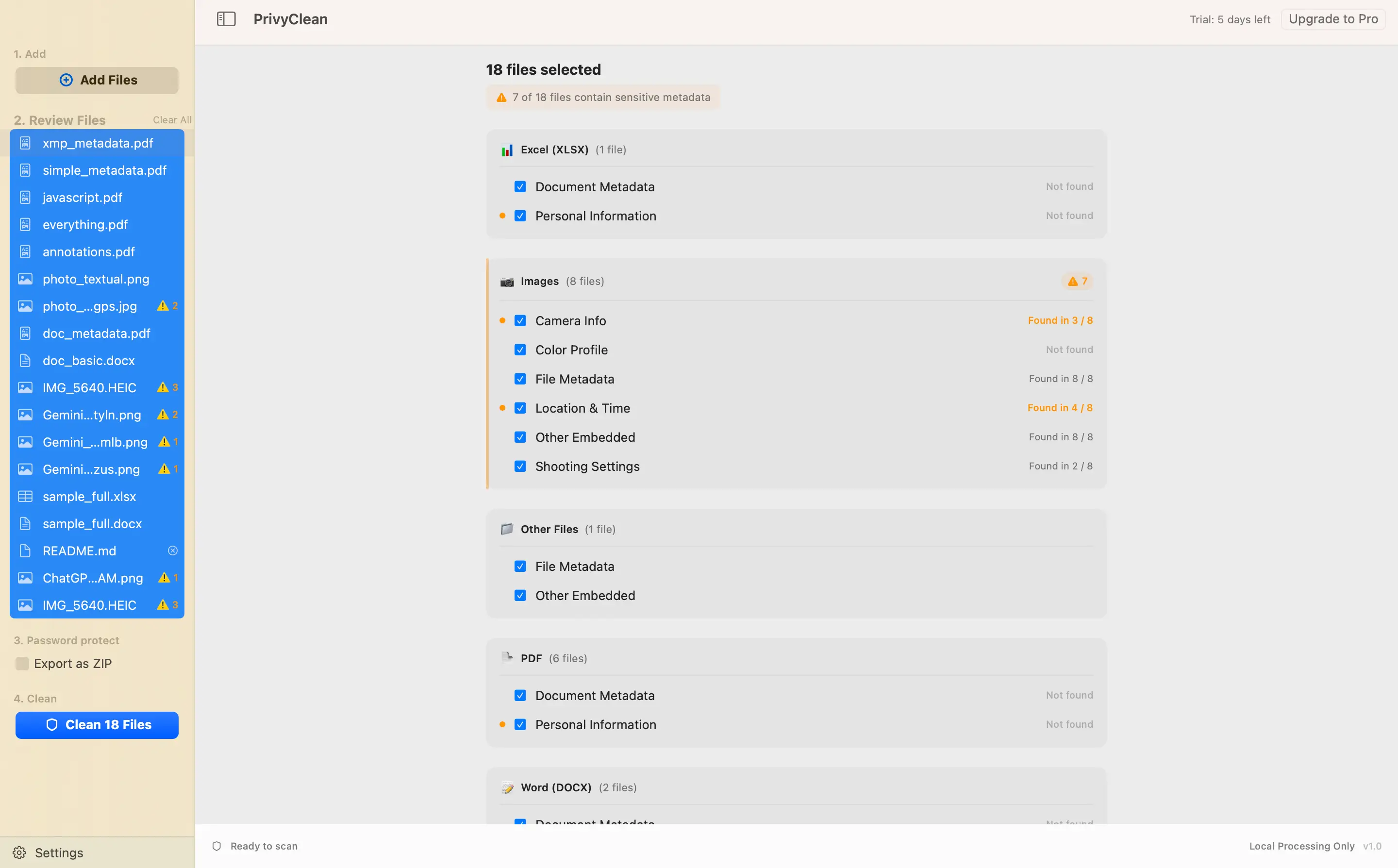
PrivyClean is a native app for iPhone, iPad, and Mac. It costs $9.99 as a one-time purchase for unlimited cleaning. Beyond basic EXIF removal, it focuses on metadata inspection — showing you what is in a file, grouped by category with risk indicators, before you decide what to clean.
Its key differences:
- C2PA content credential detection — PrivyClean detects and removes C2PA manifests (the metadata that causes Instagram, TikTok, and Pinterest to label images as AI-generated). ExifCleaner does not handle C2PA.
- Document metadata (DOCX and XLSX) — PrivyClean cleans metadata from Word and Excel documents: author name, revision history, company name, comments. ExifCleaner is image-focused.
- PDF metadata — both can clean PDF metadata, but PrivyClean's grouped preview shows which fields carry risk before you clean.
- Inspection before cleaning — PrivyClean is designed around reviewing what is in the file first. You see GPS coordinates on a map, AI metadata with a risk badge, camera info grouped together. You make a decision with that context, not after the fact.
- iOS and iPad support — works in the Files and Photos apps share sheet. ExifCleaner is desktop only.
- Mac Finder integration — quick action in Finder for right-click cleaning without opening the full app.
- Risk warnings for non-removable items — for files where some embedded content cannot be safely removed, PrivyClean flags it rather than silently failing or breaking the file.
Side-by-side comparison
| Feature | PrivyClean | ExifCleaner |
|---|---|---|
| Price | $9.99 one-time (free to try) | Free |
| Platforms | iPhone, iPad, Mac | Windows, macOS, Linux |
| Open source | No | Yes |
| C2PA / AI metadata detection | Yes | No |
| EXIF / XMP / IPTC removal | Yes | Yes |
| DOCX and XLSX metadata | Yes | No |
| PDF metadata | Yes | Partial |
| Video metadata | No | Yes |
| Metadata inspection before cleaning | Yes — grouped with risk indicators | Before/after diff after cleaning |
| Batch processing | Yes | Yes |
| Offline | Yes | Yes |
When to use ExifCleaner
- You need Windows or Linux support
- You want a free tool for standard EXIF removal
- You need to strip metadata from video files
- You prefer open-source software with auditable code
- You do not need AI/C2PA detection or document support
When to use PrivyClean
- You need to detect and remove C2PA content credentials — especially if you are trying to understand why Instagram is labeling your images
- You work with DOCX or XLSX files and need to clean author and revision data
- You want to inspect what metadata is in a file before deciding what to remove
- You are on iPhone or iPad and want share sheet integration
- You want Mac Finder integration for quick right-click cleaning
The honest bottom line
ExifCleaner is excellent for what it does. If you are on Windows, need video support, or want a free open-source option for standard EXIF stripping, it is a strong choice. PrivyClean is the better option if you are on Apple platforms, care about AI metadata detection, or want to see what is in a file before cleaning it.
They solve overlapping but not identical problems. The right choice depends on your platform and what you are cleaning.