
Clean every photo before it reaches Instagram
Batch-clean photos, HEIC, PDFs, Word and Excel in one pass — 100% offline, no account, one-time purchase. iPhone and Mac.


Free to try · iPhone $9.99 · Mac $19.99 one-time
Same photo. One cleaned, one not.
We posted an AI-generated image to Instagram twice — once straight from the AI tool, once after cleaning it with PrivyClean. Only the uncleaned one got Instagram’s AI label.
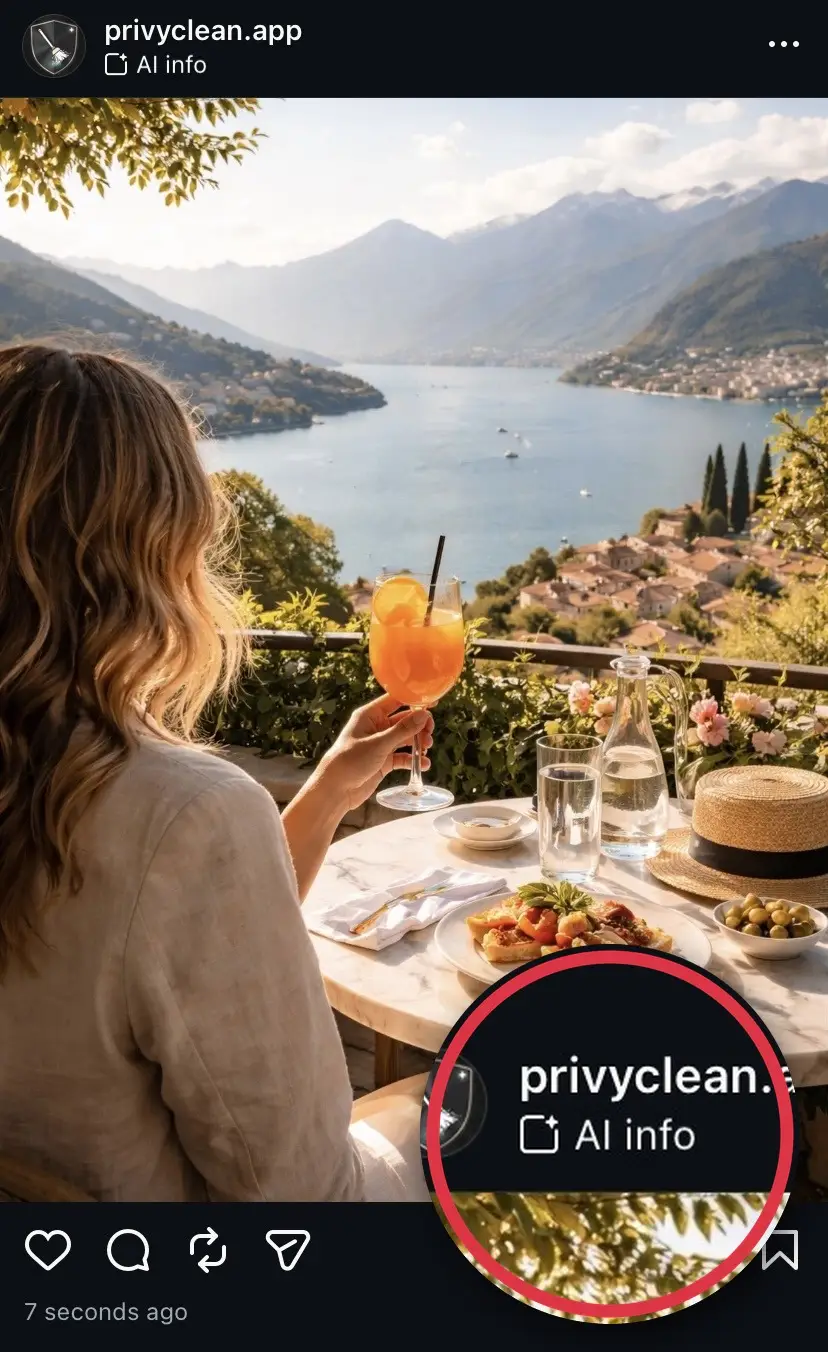
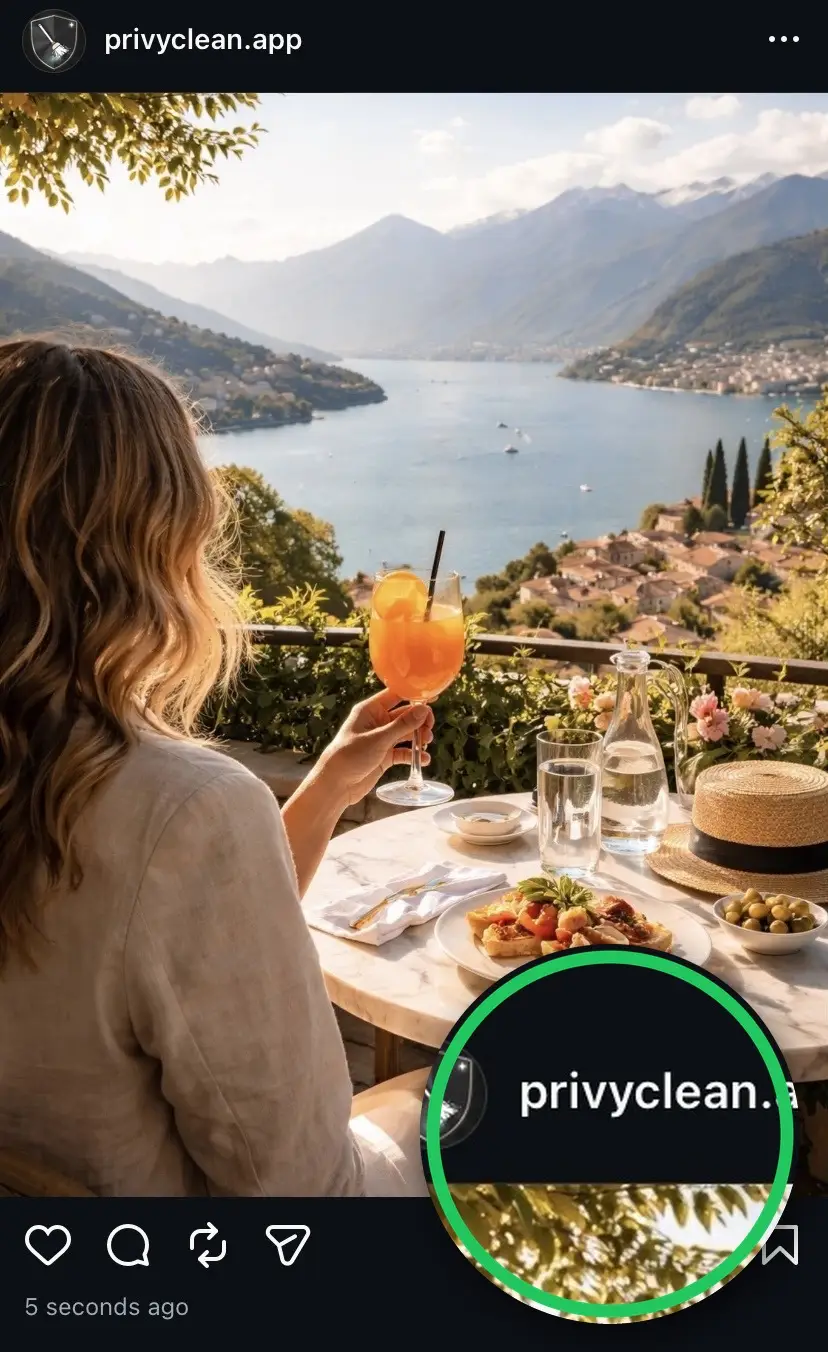
Result from our own test. Instagram’s labeling can change over time and may use other signals in the future, but removing C2PA and AI metadata addresses the most common trigger today.
You posted a photo and Instagram labeled it AI Generated. What happened?
Instagram scans each image at upload time for specific metadata signals. The
primary one is a C2PA content credentials
manifest — a cryptographically
signed block of data embedded in the file that identifies which AI tool
created or modified it. If that manifest includes a
trainedAlgorithmicMedia digital source type, Instagram applies
the "AI content" label automatically. The label has been renamed twice: it was
"Made with AI" until August 2024, then "AI info", and in 2026 Instagram started
showing it as "AI content".
Depending on where it appears and which app version you have, people see this same label called the AI content label, the AI info label, the Made with AI label, or simply the AI tag. They are all the same thing — an automatic flag driven by the C2PA content credentials and AI-related metadata embedded in your file, not by what the image looks like. Removing that metadata before you upload prevents every variant of the label.
One thing that is not the same: the account-level "AI-generated profile" label on your profile (called "AI creator" until 31 August 2026) is a separate system with a different fix. If that is what you are seeing, read how to remove the AI-generated profile label from your Instagram profile.
This process is fully automated. No human reviews the image before the label appears. Instagram cannot tell whether you intended the label or whether it is a false positive from a minor AI-assisted edit.
Just need to fix one photo? Remove the AI metadata free, right here
Drop a JPEG or PNG below to strip the C2PA and AI metadata that triggers the label — one free clean, processed entirely in your browser. Nothing is uploaded, no account needed, done in about 30 seconds. For unlimited cleaning across photos, PDFs, Word, Excel and HEIC files, use the iPhone or Mac app.
Drop an image here or click to browse
JPEG, PNG, WebP — up to 25 MB. Processed entirely in your browser.
🔒 Your files never leave your browser. All processing happens locally — no server uploads, no tracking.
What triggers the AI content label
Several types of metadata can cause Instagram to apply the label:
- C2PA content credentials from tools like ChatGPT/DALL-E, Adobe Firefly, and Microsoft Copilot/Designer. These are cryptographically signed manifests stored in JUMBF blocks inside the file.
- IPTC Digital Source Type set to
trainedAlgorithmicMedia— the standard tag indicating AI generation, used by Midjourney, many stock photo platforms, and other tools. - XMP tags identifying AI generation tools — the
xmp:CreatorToolfield may read "Adobe Firefly" or "DALL-E," which platforms also scan. - Adobe Creative Cloud apps — Photoshop and Lightroom embed C2PA content credentials whenever any AI feature is used, including Generative Fill, Generative Expand, Neural Filters, AI-powered Denoise, and AI Masking.
That last point is the source of most false positives. A real photograph edited with a single Generative Fill stroke receives the same C2PA tag as a fully AI-generated DALL-E image.
The false positive problem for photographers
Instagram has no way to distinguish between "this image was 100% generated by AI" and "this is a real photograph where the photographer removed a power line with Generative Fill." Both produce the same C2PA tag. Both get labeled.
This is a serious issue for working photographers, wedding shooters, and commercial photographers who use AI-powered editing tools as part of their normal workflow. A client receiving an edited photo portfolio may see AI labels on real photographs they commissioned for authentic documentary purposes.
Once the label is applied to a published post, it cannot be removed from that post. The only option is to delete the post and re-upload with a clean file — our free C2PA remover strips the content credentials from the image right in your browser.
How to prevent the AI content label before posting
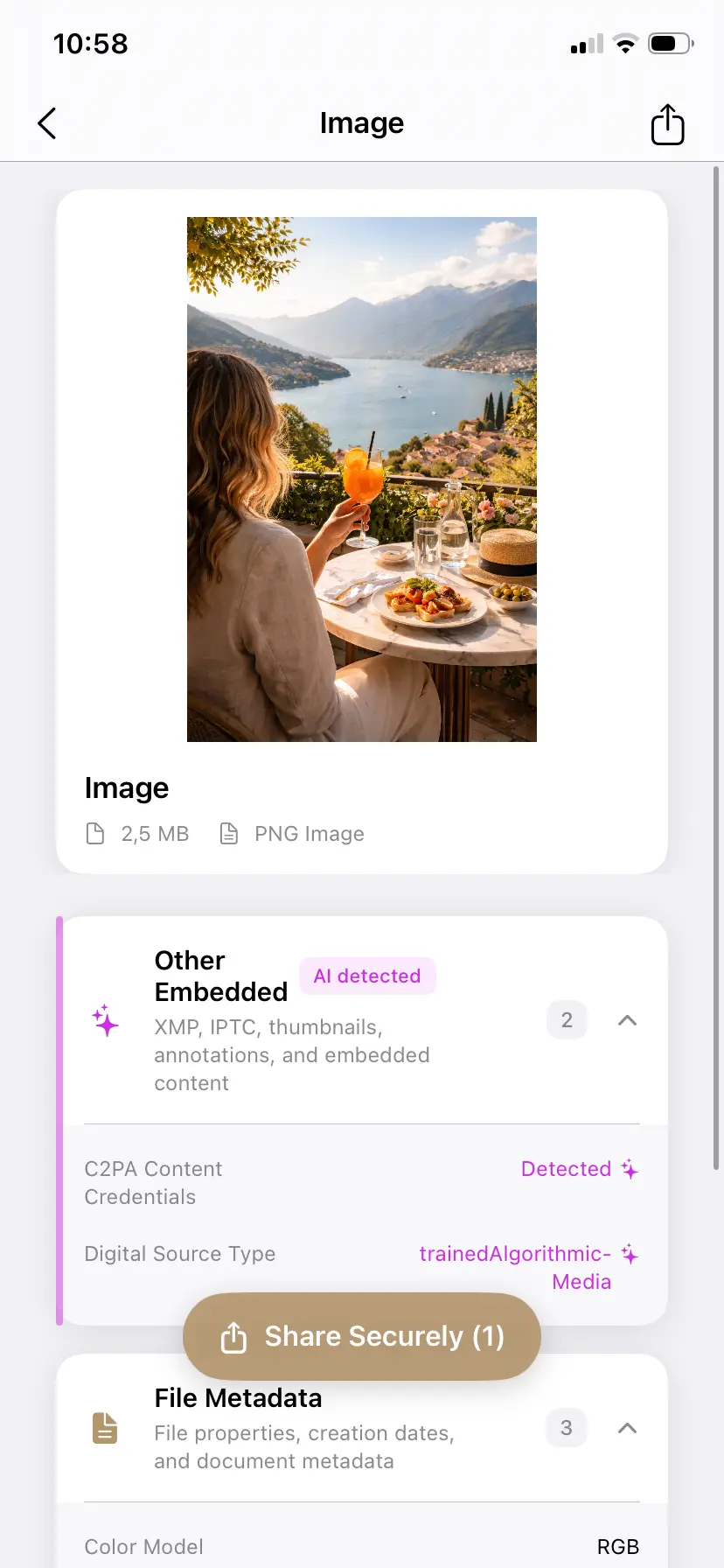
- Inspect the file before uploading. Open the image in PrivyClean to check whether C2PA or AI-related metadata is present. The app groups metadata by category so you can quickly see if AI content credentials are attached. Not sure whether a photo is affected? You can check whether your photo carries the AI metadata that triggers the label before you post it.
- Decide whether to clean. If the AI metadata is a false positive from a minor edit, you may want to remove it. If the image is genuinely AI-generated and you want transparency with your audience, keep it.
- Export a clean copy. PrivyClean exports a new file with the selected metadata removed. Your original file stays untouched.
- Upload the clean copy to Instagram. The cleaned file no longer carries the metadata signal that triggers the label. The "Add AI label" toggle is still yours to use — switch it on if you want to disclose AI involvement yourself.
If you export from Photoshop or Lightroom, you can also disable Content Credentials in the export settings before generating the file. But this only works if you remember before exporting — PrivyClean handles the case where you already have the exported file and want to inspect it.
For a full explanation of C2PA and which metadata fields are involved, see our plain-English guide to C2PA content credentials.
Watch: the hidden metadata behind the label, in 23 seconds
Why switching off "Add AI label" doesn't remove the label
When you post, Instagram shows an "Add AI label" toggle, and it is natural to assume that leaving it off keeps the label away. It does not. That toggle is your own disclosure — a way to label content yourself. The automatic "AI content" label is a separate system: if the file carries C2PA content credentials or AI-related metadata, Instagram adds the label at upload whether the toggle is on or off. We re-tested this in September 2026.
So if you are wondering "why does my post say AI content when I left the AI label off?" — it is because the image you uploaded carried that metadata, and Instagram read it the moment you uploaded. The label reflects the file, not a setting, which is why nothing in your post options or account settings turns it off.
If you have already posted and the label is showing, you cannot switch it off in Edit — the automatic label stays on the live post. The only way to take it off is to delete the post and re-upload a version of the image with the metadata cleaned first. Re-uploading the exact same file will produce the exact same label, so the file has to be cleaned before the new upload — that is the step that actually changes the outcome. The same applies to Stories and Reels: there is no way to turn the label off after publishing, so you delete and re-share a cleaned file.
Troubleshooting: when the label will not go away
These are the situations people hit most often after trying the obvious fixes:
- "I switched off 'Add AI label' and it still got labeled." That toggle only controls your own disclosure. The automatic label comes from the file, so it appears whenever the file still carries AI metadata.
- "Edit won't let me remove it." Correct — the automatic label cannot be switched off on a live post. Delete it, clean the file, and repost.
- "I turned off the AI setting in Edit profile." That is the account-level "AI-generated profile" label (formerly "AI creator"), a different system that does not affect individual posts.
- "It turned back on / it's still showing." If a re-upload got labeled again, the file you re-uploaded still carried the metadata. Cleaning has to happen on the file itself before upload — verify by checking which AI markers the file still carries and confirming the AI & Provenance group is empty.
- "I only used CapCut / Canva / color correction." AI-assisted features inside ordinary editors write full provenance metadata even for minor edits. Inspect the exported file — you will usually find a C2PA manifest naming the tool.
- "I cleaned the wrong copy." Messaging apps, cloud re-compression, and "save from chat" copies behave inconsistently. Always clean the exact file you plan to upload, not a copy that has been through another app.
- "Does a business / creator account change anything?" No — the label is applied from the file at upload for all account types.
Still labeled after all of that?
Inspect the exact file you are about to upload and see which AI markers it still carries — then clean them and post the copy. Works offline on iPhone and Mac, one-time purchase.
Free to try · iPhone $9.99 · Mac $19.99 one-time
Removing the AI label from Instagram Stories and Reels
The "AI content" label is not limited to feed posts. Instagram reads the file, not the surface you post to — so the same label can appear on Stories, Reel covers, and feed posts whenever the underlying image carries C2PA content credentials or AI metadata. The trigger is identical in every case.
The fix is also identical: clean the image's metadata before you upload it and the label will not appear, whether you are posting a Story, a Reel cover, or a regular post. As with posts, the label cannot be switched off after publishing — you have to delete the Story or Reel and re-upload a cleaned file. Turning off your own AI disclosure does not stop it either while the AI metadata is still in the file.
Stories have their own quirks — template apps, Highlights, and the fast delete-and-repost loop — covered in our dedicated guide: removing the AI content label from Instagram Stories.
The same label across Meta: Facebook, Marketplace, and Pages
Instagram is one surface of a single Meta system. The same C2PA content credentials that trigger the "AI content" label on Instagram trigger Meta's AI label on Facebook posts, Page posts, Group posts, and Marketplace listings — Meta reads the file, not the app you happened to open. Facebook has shown the label as "Made with AI" and "AI info", and people now search for it as "AI content" too; on either app, the dependable fix is to clean the file before you upload.
One practical consequence: if you cross-post the same photo to Instagram and Facebook, cleaning it once is enough for both. If you clean only the copy you send to Instagram, the Facebook version keeps its credentials and gets labeled on its own. See how to remove AI labels across every platform for the Facebook, Marketplace, and cross-platform steps.
Does this work on Android?
The metadata that triggers Instagram's AI label lives inside the file, so the approach is the same on any device: clean the image before uploading. PrivyClean is currently available for iPhone and Mac. There is no Android app yet — join the waitlist to hear if that changes.
In the meantime, Android users can clean a JPEG or PNG directly in the browser with our free online metadata checker — it runs entirely on your device, with no upload — then post the cleaned file from your Android phone.
If you edit on a desktop before posting, the metadata remover for Mac is the faster route for anything beyond a single image: it cleans a whole shoot in one pass and adds a right-click Finder Quick Action, so files are stripped of EXIF, GPS and AI metadata before they ever reach your phone.
When you should keep the AI content label
There are situations where keeping AI metadata is the right call:
- The image is fully AI-generated and you value transparency with your audience about how it was made.
- You are distributing content in the EU and want to comply proactively with AI disclosure requirements ahead of the August 2, 2026 EU AI Act deadline.
- Your editorial or journalistic standards require disclosure of AI involvement, even minor.
- Your audience or client has specifically asked for provenance information to be retained in the file.
Metadata control is not the same as deception. The goal is to make an intentional, informed choice — not to remove metadata blindly. If you clean a file that is genuinely AI-generated, you can still disclose it with the "Add AI label" toggle when you post. Learn more about how this affects different types of creators in our EU AI Act overview.
What about taking a screenshot instead?
Screenshots strip metadata but also significantly reduce image quality. Instagram compresses images at upload; starting from a screenshot adds another compression step before that. The result is noticeably lower quality compared to uploading the original file with metadata cleaned properly.
Re-saving in some apps (like Apple Photos) may strip some metadata, but the behavior is inconsistent across versions and file types. A dedicated metadata tool gives you visibility into what was actually removed before you upload.
Related guides
- Remove the AI content label from Instagram Stories
- The "AI-generated profile" (AI creator) label vs the "AI content" post tag
- How to remove AI labels on Facebook and every other platform
- TikTok's "AI-generated" label, explained
- X's "Made with AI" label, explained
- LinkedIn's "CR" content credentials badge
- Remove C2PA content credentials from any image
- What is C2PA? Content credentials explained
- What Pinterest's "AI modified" tag means and how to remove it
- Other metadata Instagram can read from your photos