
Clean hidden metadata before you share
Inspect what is embedded in your photos and documents, remove what you choose, and export a clean copy — 100% offline on iPhone and Mac, no account, one-time purchase.


Free to try · iPhone $9.99 · Mac $19.99 one-time
How Pinterest detects AI-generated images
Pinterest applies two layers of detection. The first is metadata-based: it reads C2PA content credentials and IPTC Digital Source Type tags embedded in the image file. If either signals AI generation, the image is flagged. The second layer is Pinterest's own visual classification model, which analyzes pixel patterns for characteristics associated with AI-generated images.
Both signals can independently trigger detection. This means that even if you remove metadata, a highly stylized AI image may still be identified by visual analysis. Conversely, even a realistic photograph can be flagged if it carries AI-related metadata from editing tools — the false positive problem that affects Photoshop users. For that case, stripping the C2PA manifest with a C2PA remover before pinning removes the metadata trigger entirely.
Pinterest's approach differs from Instagram's in one important way: where Instagram adds a visible label, Pinterest may also restrict distribution. Flagged pins can see significantly reduced impressions, lower ranking in search results, and reduced appearance in home feeds. For creators who rely on Pinterest for traffic, this has real business impact.
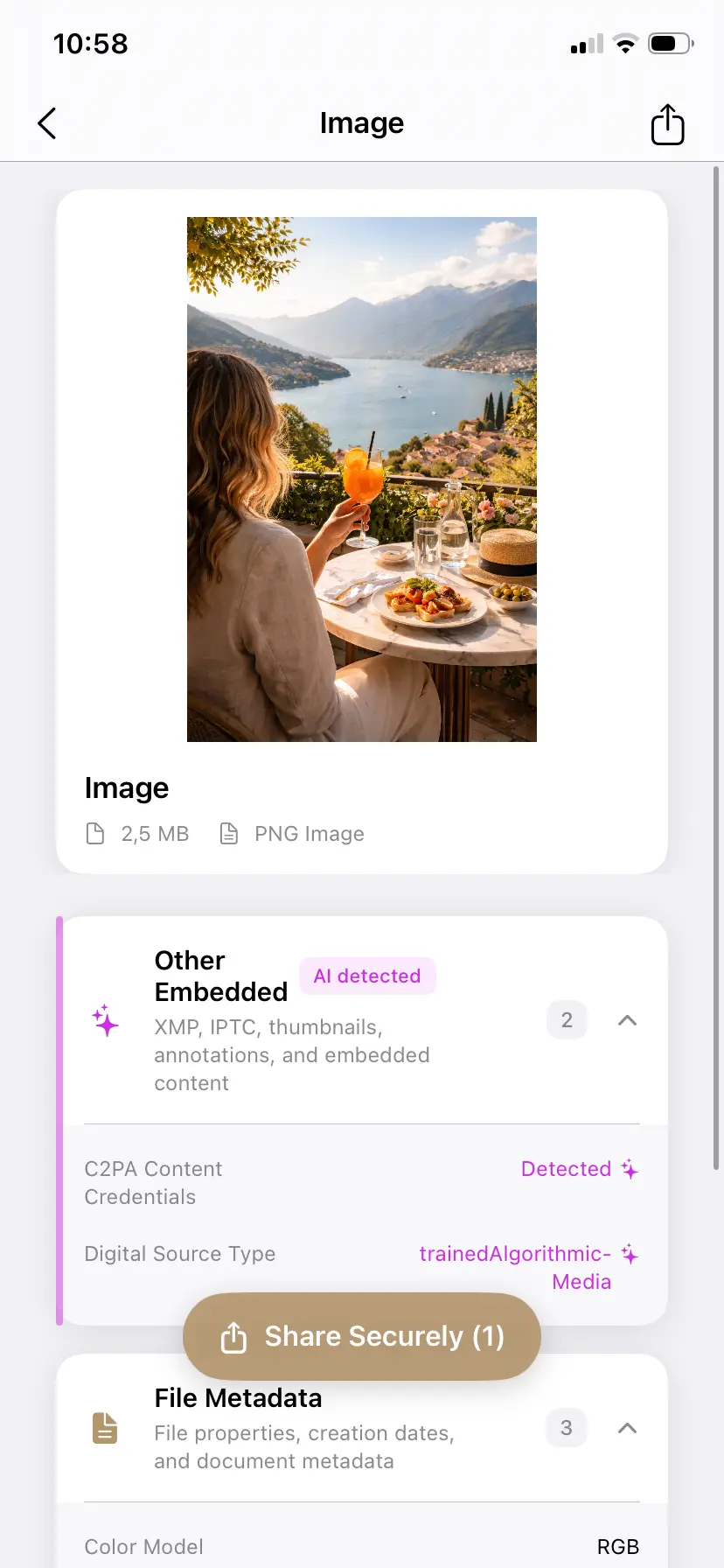
What metadata Pinterest scans for
The metadata signals that most commonly trigger Pinterest's detection system:
- C2PA content credentials — the cryptographic manifests written by ChatGPT/DALL-E, Adobe Firefly, Microsoft Designer, and others. Pinterest reads these the same way Instagram does.
- IPTC Digital Source Type set to
trainedAlgorithmicMedia— the standard tag used by Midjourney, many stock platforms, and tools that don't use full C2PA but do write IPTC fields. - PNG tEXt chunks from Stable Diffusion and ComfyUI — these embed the full generation prompt, model name, sampler settings, and seed as plaintext in PNG files. They are not part of EXIF or XMP but are clearly readable by any metadata parser.
- XMP generation parameters — the
xmp:CreatorToolfield and related XMP properties that identify the generating tool.
For a technical explanation of how C2PA manifests work and where they are stored, see our plain-English guide to C2PA.
Why this matters for creators and sellers
The people most affected by Pinterest's AI detection fall into a few categories:
- Print-on-demand sellers using AI-generated designs for products listed on Etsy, Redbubble, or Printify. Pins linking to these products may be flagged if the product images contain AI metadata.
- AI art accounts that have built followings on Pinterest and are seeing reduced distribution after platform-wide detection updates.
- Photographers who edit with Photoshop or Lightroom and use AI features. A real photograph exported after using Generative Fill carries C2PA metadata that Pinterest reads as AI-generated content — even if the image is primarily authentic photography.
- Bloggers and content creators who use AI image tools for illustrations or featured images. If the source file has not been cleaned, the metadata travels with the image.
How to inspect and clean images before pinning
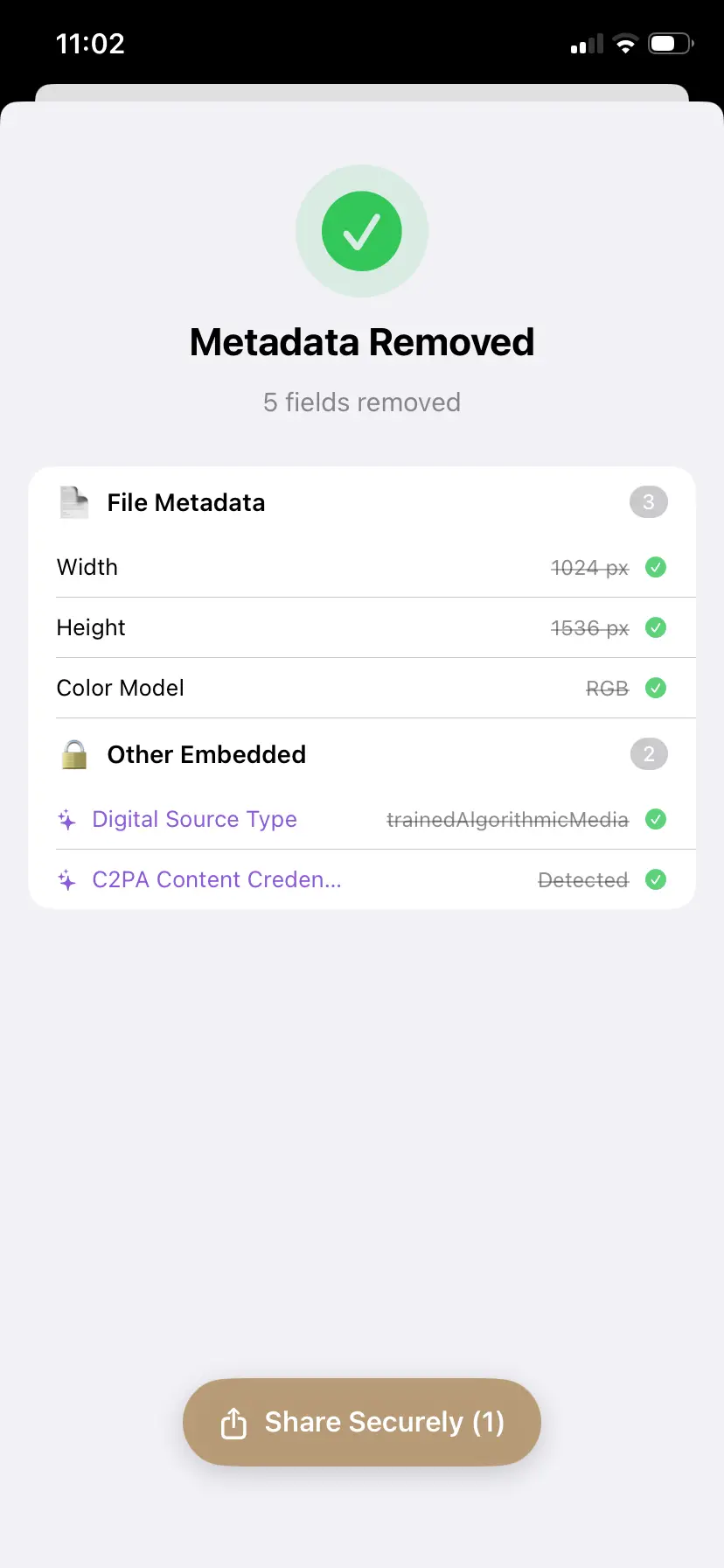
- Open the source file in PrivyClean before downloading or pinning it. The app checks for C2PA credentials, IPTC Digital Source Type, XMP generation tags, and PNG chunk data in a single view.
- Review what is found. PrivyClean groups metadata by category so you can quickly see whether AI signals are present. You also see which specific tool wrote the metadata.
- Export a clean copy if you decide to remove the metadata. The original file is not modified. The cleaned export is what you then use as the pin image.
An important caveat: Pinterest also uses pixel-level visual analysis, so metadata removal addresses one detection signal but may not prevent all detection for images that have strong visual characteristics of AI generation. Being transparent about this limitation matters — a tool that promises to bypass all detection is overpromising.
Handling AI content responsibly on Pinterest
- Clean metadata you have a legitimate reason to remove — most commonly false positives, where a real photograph is flagged because of a minor AI-assisted edit. PrivyClean is for inspecting and cleaning that metadata, not for disguising genuinely AI-generated images as authentic photography.
- For genuinely AI-generated work, keep the credentials and disclose. Pinterest's visual classifier analyzes pixels, not just metadata, so trying to defeat it is both unreliable and works against the provenance signals the platform is choosing to surface.
- Consider whether transparency about AI involvement actually helps your account. Some Pinterest audiences, particularly in art and illustration communities, respond better to disclosure than to unlabeled AI content.
- Check Pinterest's creator policies for the current rules on AI content in your specific niche. Commercial and shopping categories have stricter policies than lifestyle or inspirational content.
Related guides
- Full guide to removing AI metadata from images
- Why Instagram labels photos as AI Generated
- EU AI Act and AI content disclosure