
Same photo, one labeled by Meta and one not
We posted an AI-generated image twice — once straight from the AI tool, once after cleaning the metadata first. Meta's system labeled only the version still carrying its content credentials. Instagram and Facebook use the same labeling pipeline.
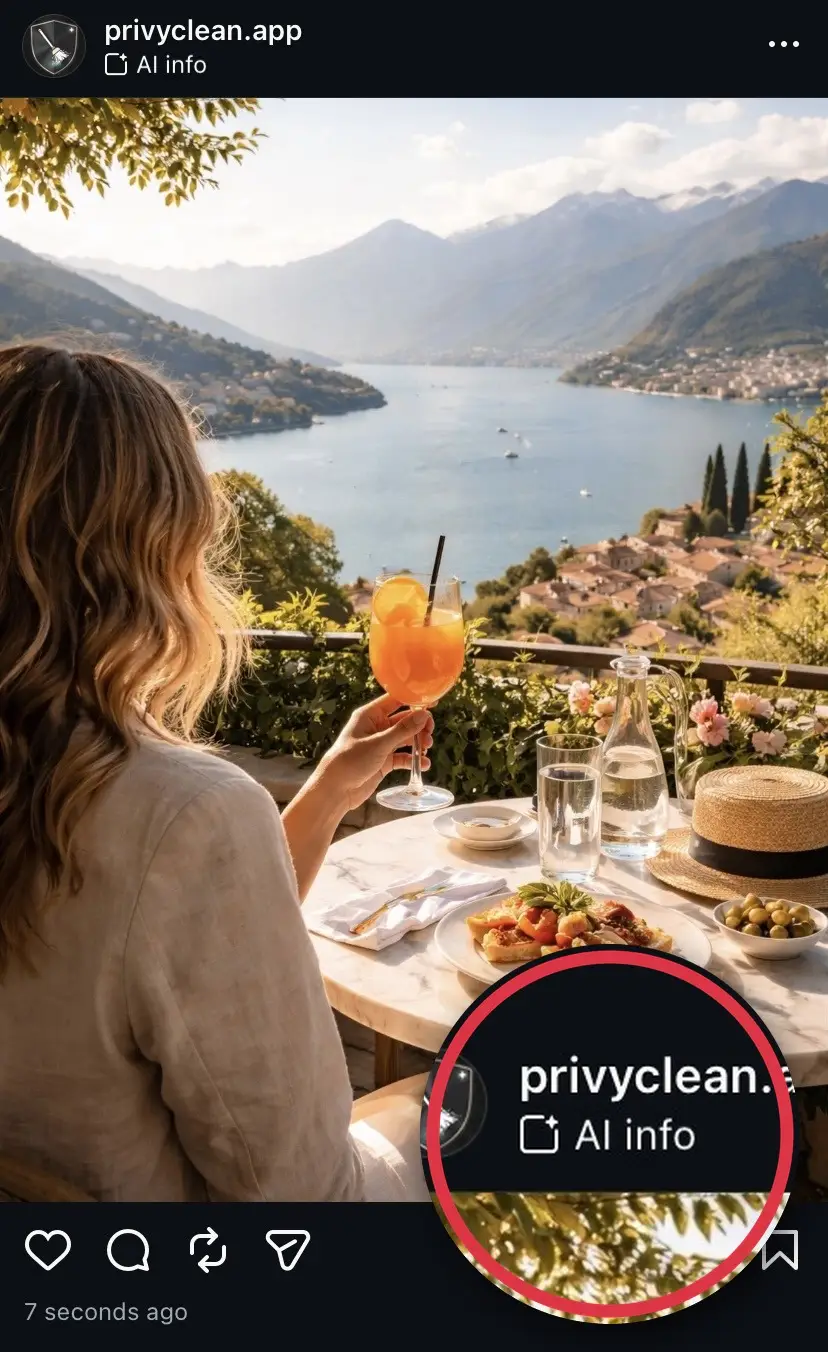

Result from our own test. Instagram’s labeling can change over time and may use other signals in the future, but removing C2PA and AI metadata addresses the most common trigger today.
Clean the AI label before you post
PrivyClean removes C2PA and AI metadata in seconds — on iPhone and Mac.


3 free cleans to try · iPhone $7.99 · Mac $14.99 one-time
Just need to fix one image? Remove the AI metadata free, right here
Drop a JPEG or PNG below to strip the C2PA and AI metadata that triggers the label — one free clean, processed entirely in your browser. Nothing is uploaded, no account needed, done in about 30 seconds. For unlimited cleaning across photos, PDFs, Word, Excel and HEIC files, use the iPhone or Mac app.
Drop an image here or click to browse
JPEG, PNG, WebP — up to 25 MB. Processed entirely in your browser.
🔒 Your files never leave your browser. All processing happens locally — no server uploads, no tracking.
Why Facebook labels your post "AI Info"
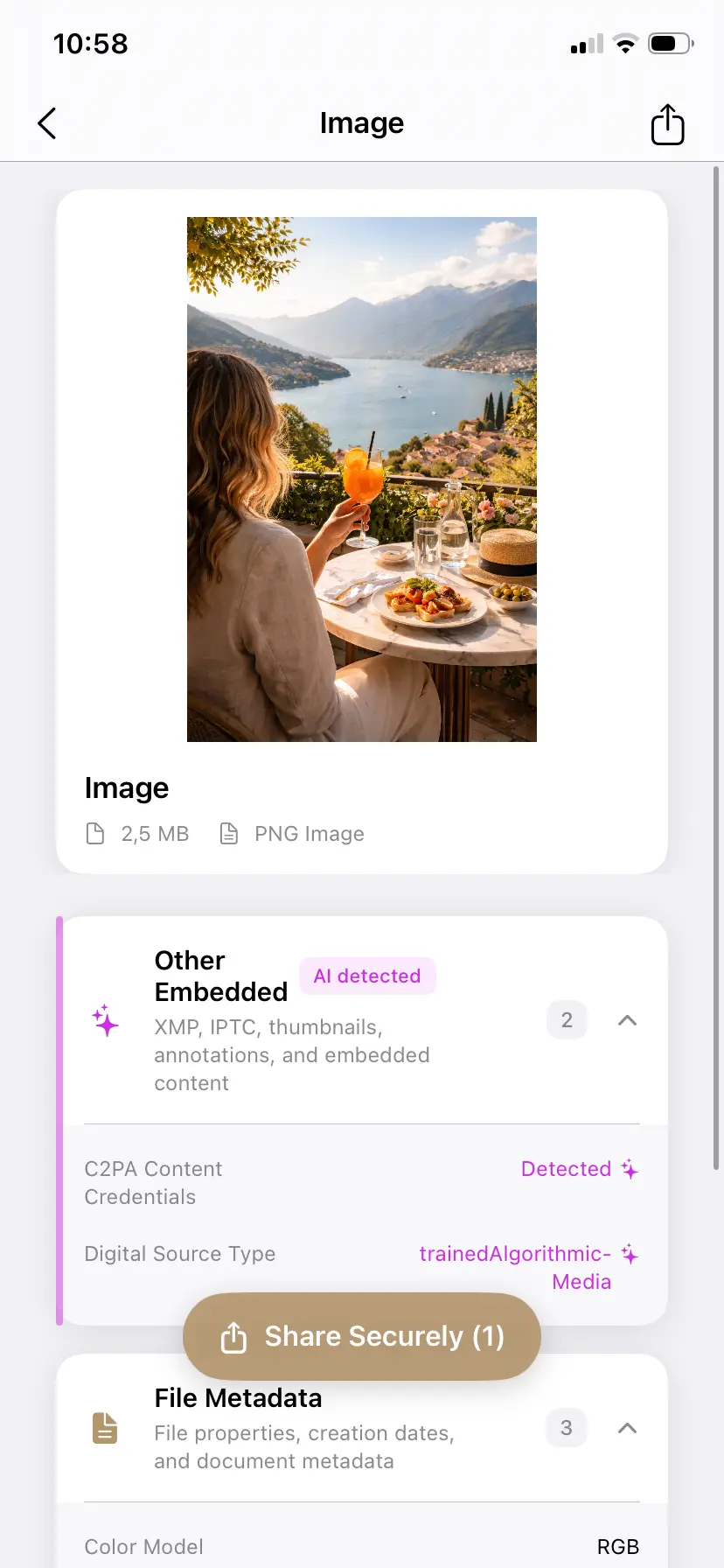
The label is not Facebook looking at your picture and deciding it looks AI-generated. It is Facebook reading a block of hidden data inside the file — C2PA content credentials and IPTC "Digital Source Type" tags — that AI tools write into images automatically. Meta reads that data the moment you upload and applies the "AI Info" label without any human review.
Because it is the same Meta pipeline behind Instagram's label, everything that triggers it on Instagram triggers it on Facebook too. If you have seen our Instagram AI label guide, the mechanism here is identical — only the surfaces differ (profile, Pages, Groups, Marketplace).
What actually triggers the label
The trigger is metadata, not pixels. The most common sources are:
- Fully AI-generated images from ChatGPT / DALL-E, Adobe Firefly, Google Gemini, or Microsoft Designer — all embed C2PA content credentials by default.
- Real photos touched by an AI feature — a single use of Photoshop Generative Fill, Generative Expand, AI Remove, or AI Denoise on an otherwise real photograph writes a full C2PA manifest into the file. This is the most common cause of false positives.
- Exports from AI-assisted editors like CapCut, Canva, or Luminar, which can pass provenance tags through to the final file.
Why there is no button to turn off the AI label
People look for a setting in Facebook or Meta Account Center to switch the label off, and there is not one. That is by design: the label reflects what is in the file, so Meta does not expose an account-level override. As long as the image carries AI content credentials, the label can appear — which is why the only reliable control is the metadata in the file itself.
Can you remove the AI label after posting?
Not by editing the post. Meta evaluates and caches the AI status when the image is first uploaded, so editing the caption or the post does not re-check the file. To clear the label you have to:
- delete the labeled post,
- clean the C2PA and AI metadata from the original image file, and
- upload the cleaned file as a brand-new post.
Re-saving a screenshot of the image is unreliable and degrades quality. Removing the metadata from the original file is the clean fix.
How to remove the AI metadata before posting
The privacy-first approach is to inspect first, then decide — not strip blindly:
- Inspect the file so you can see exactly which content credentials are present and which AI tool wrote them.
- Remove the C2PA manifest and AI IPTC tags, keeping a clean copy and leaving your original untouched.
- Post the cleaned copy. Because the trigger is gone, Meta has nothing to label.
PrivyClean does all of this entirely offline — your photo never leaves your device, which matters when the whole point is privacy. Use the free in-browser tool above for one image, or the iPhone and Mac apps for batches and other file types.
The false-positive problem
The label was designed to flag AI-generated content, but in practice it fires on real photographs that merely passed through an AI-assisted editor. A photographer who used AI Denoise on a real wedding photo gets the same "AI Info" label as a fully synthetic image. Removing the metadata is how you correct that misrepresentation of your own work.
When you should keep the AI label
Removing AI metadata is about accuracy and control, not concealment. Keep the label when the content genuinely is AI-generated and your audience or context benefits from that disclosure — and note that distributing content in the EU may carry disclosure obligations under the EU AI Act (effective August 2026). Inspect, understand what the file says, and make an informed choice.
Related guides
- How to remove the AI label on Instagram
- How to remove AI labels and content credentials from images
- What is C2PA? Content credentials explained
- How to check if your image has AI metadata