
Clean hidden metadata before you share
Inspect what is embedded in your photos and documents, remove what you choose, and export a clean copy — 100% offline on iPhone and Mac, no account, one-time purchase.


Free to try · iPhone $9.99 · Mac $29.99 one-time
How TikTok's detection actually works
TikTok reads C2PA content credentials at upload — the same standard behind Instagram's "AI Info" label, X's "Made with AI" label, and LinkedIn's CR badge. If the metadata signals AI generation or AI editing, the label is applied automatically, with no review and no toggle. TikTok layers its own detection models on top, but intact C2PA is the deterministic trigger — and the only one visible in your file before you post.
- Photo mode, carousels, and thumbnails — ordinary image files that carry C2PA exactly like an Instagram upload. A ChatGPT image or an AI-retouched photo brings its credentials with it.
- Videos — MP4 files can carry C2PA from AI video tools, and TikTok's own AI effects attach credentials to downloads.
- The false-positive path — real footage or photos exported through CapCut, Canva, or Photoshop after one AI-assisted edit inherit AI provenance markers, and get labeled like fully synthetic content.
Check what TikTok will see — free, in your browser
Drop a photo, carousel image, or thumbnail below to see the C2PA and AI metadata it carries and strip it — one free clean, processed entirely in your browser, nothing uploaded. For unlimited images and batches, use the iPhone or Mac app.
Drop an image here or click to browse
JPEG, PNG, WebP — up to 25 MB. Processed entirely in your browser.
🔒 Your files never leave your browser. All processing happens locally — no server uploads, no tracking.
Auto-labeled already? It can't be toggled off
Like X's automatic label, TikTok's auto-applied AI label has no off switch — the AI status is decided at upload. For a mislabeled post:
- Delete the labeled post.
- Clean the AI metadata from the original files — every image in a carousel, and the thumbnail.
- Re-upload the cleaned version. No markers, nothing to auto-detect.
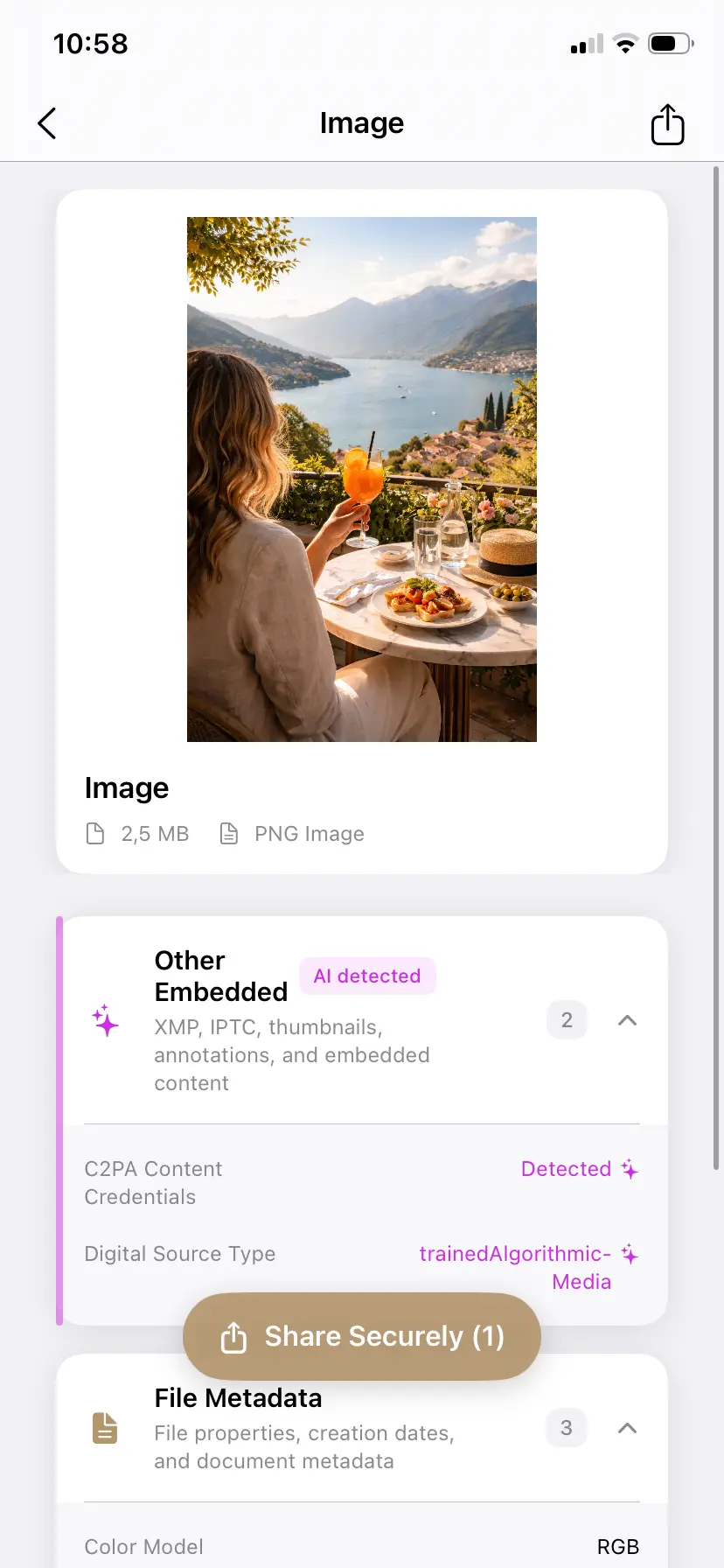
Inspect before you post to TikTok
PrivyClean shows the AI metadata TikTok will read in your photos, carousels, and thumbnails — and removes it in seconds. 100% offline.
Free to try · iPhone $9.99 · Mac $29.99 one-time
Why was my TikTok labeled when I didn't use AI?
The most common TikTok-specific false-positive paths, in rough order of how often we see them:
- CapCut templates and effects. TikTok's sister app ships AI-assisted features throughout its templates, and its exports can carry AI provenance markers even when you only used a transition pack or a color preset on real footage. Because CapCut is the default editor for a huge share of TikTok creators, this is the single biggest false-positive source on the platform.
- TikTok's own AI effects, re-uploaded. Content that went through a TikTok AI effect carries credentials when downloaded. If you download your own video and re-upload it (or repost it elsewhere and bring it back), the marker travels with it.
- One image in a carousel. Photo-mode posts are evaluated per file — a single AI-touched image in an otherwise-real carousel can label the whole post. Clean every image in the set, not just the first.
- The thumbnail. A cover frame exported through an AI-assisted editor can carry markers even when the video itself is clean.
What doesn't remove the label (so you can skip trying)
- Toggling the AIGC switch off — the auto-label is not controlled by the self-disclosure toggle; they are separate systems.
- Editing the post or caption — the AI status was cached at upload and is not re-evaluated.
- Deleting and re-uploading the same file — same metadata, same label. The file has to be cleaned before the re-upload.
- Waiting — auto-labels do not expire or get re-reviewed.
Does the AI label hurt reach on TikTok?
TikTok has not documented a reach penalty for the label itself — it is a transparency feature. The reach risk runs the other way: undisclosed realistic synthetic media violates TikTok's rules and can be removed or demoted. So for genuinely AI content, the label protects your distribution; for falsely-labeled real content, the cost is credibility with your audience, which is exactly why correcting false positives matters.
When you must keep the disclosure
TikTok's rules are stricter than Meta's on this point: AI-generated content that realistically depicts people, places, or events requires disclosure, and undisclosed realistic synthetic media can be removed or have its reach reduced. If your content genuinely is AI-made, use the AIGC toggle — the label is the compliant path, and in the EU the AI Act's transparency rules point the same direction from August 2026. Metadata cleaning is for correcting false positives on real content, not for evading disclosure your content actually requires.
Related guides
- The complete Instagram AI label guide
- How to remove the AI Info label from Instagram Stories
- X's "Made with AI" label, explained
- How to remove AI labels on Facebook and every other platform
- Remove C2PA content credentials from any image (free tool)
- What is C2PA? Content credentials explained