
Clean hidden metadata before you share
Inspect what is embedded in your photos and documents, remove what you choose, and export a clean copy — 100% offline on iPhone and Mac, no account, one-time purchase.


Free to try · iPhone $9.99 · Mac $29.99 one-time
Can the label be removed? Depends which of the two you have
- The manual disclosure toggle — you set it when composing a post with AI content. You can remove it later; it is your setting.
- The automatic label — X detects AI provenance metadata in the uploaded image and applies the label itself. On these posts the label setting is grayed out and cannot be changed. There is no appeal button and no off switch.
That second case is what catches people out. The label reflects what X found inside your file at upload — so the file, not your settings, is the only thing you control.
What actually triggers the automatic label
Independent testing points squarely at C2PA content credentials — the same hidden provenance standard behind Instagram's "AI Info" label and Meta's system generally:
- ChatGPT / DALL-E images: consistently auto-labeled — OpenAI embeds C2PA in every export.
- Grok images: not labeled — Grok's output carries no C2PA, so there is nothing for the system to read. Same pixels-look-AI, different metadata, different outcome.
- Gemini and other C2PA tools: inconsistent in testing — X appears to combine metadata with its own undisclosed criteria, but intact C2PA is the one input you can see and control.
- AI-edited real photos: a Generative Fill pass or an AI eraser can write the same class of provenance metadata into a genuine photograph — the false-positive case this site exists for.
Check what X will see — free, in your browser
Drop an image below to see the C2PA and AI metadata it carries and strip it — one free clean, processed entirely in your browser, nothing uploaded. For unlimited images and batches, use the iPhone or Mac app.
Drop an image here or click to browse
JPEG, PNG, WebP — up to 25 MB. Processed entirely in your browser.
🔒 Your files never leave your browser. All processing happens locally — no server uploads, no tracking.
Already posted and auto-labeled? The setting will stay gray
X decides the AI status at ingest and does not re-evaluate a live post — and its own re-encoding of images afterwards changes nothing about the label. The working sequence is:
- Delete the labeled post.
- Clean the C2PA and AI metadata from the original file (not a copy downloaded back from X).
- Post the cleaned file. With no provenance markers, there is nothing to auto-detect.
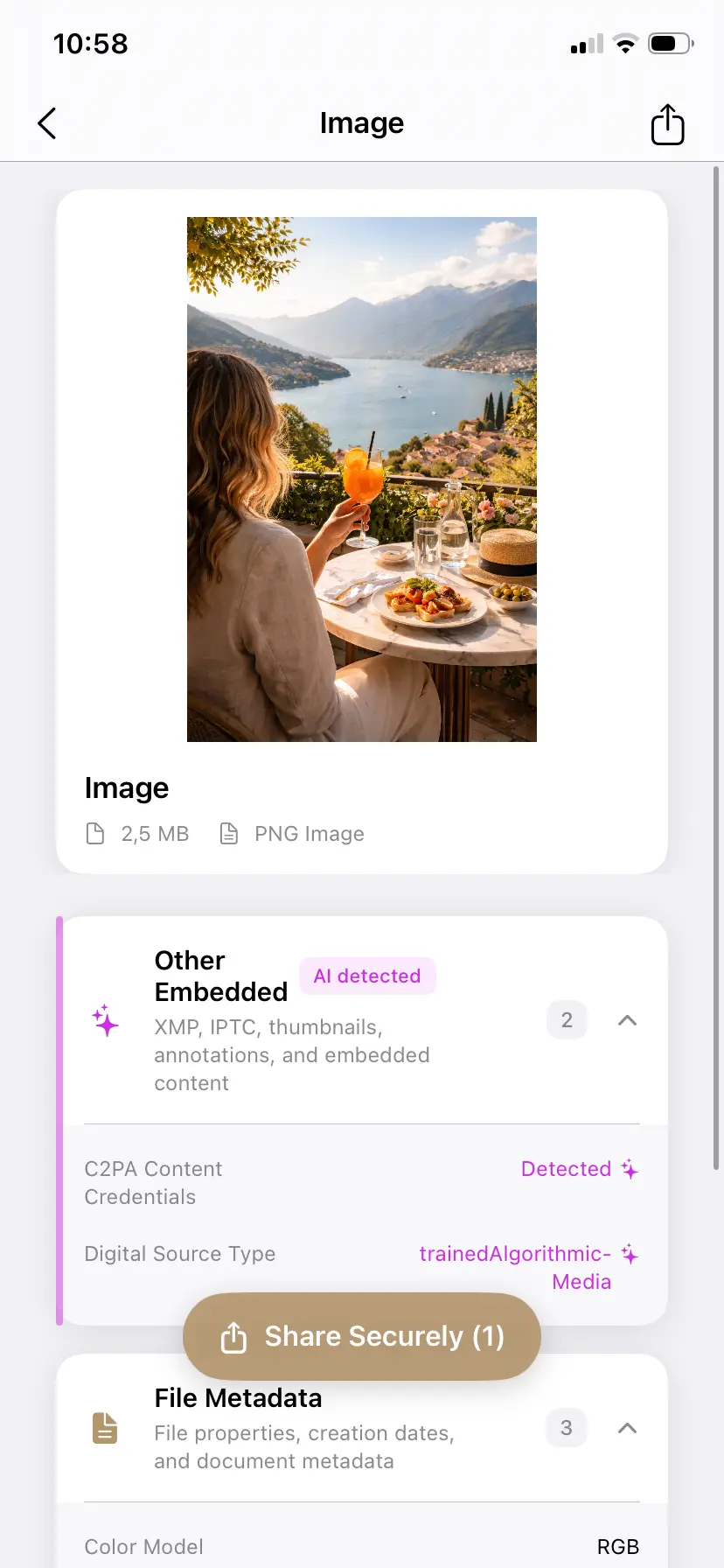
Inspect before you post to X
PrivyClean shows the AI metadata X will read and removes it in seconds — 100% offline on iPhone and Mac.
Free to try · iPhone $9.99 · Mac $29.99 one-time
Why was my real photo labeled "Made with AI"?
If you never generated anything and never touched the disclosure toggle, one of these almost certainly happened to the file:
- An AI-assisted edit on a real photo. Photoshop's Generative Fill or AI Remove, Google Photos' Magic Eraser, and similar one-tap features write a full C2PA manifest into the export — testing has confirmed Magic Eraser output carries exactly the class of metadata X reads. The photo is real; the file says AI.
- An AI-touched image saved from another app. A graphic passed through Canva or an AI-assisted design tool keeps its provenance markers into your camera roll and onto X.
- Re-sharing labeled content. An image that was generated elsewhere and saved with credentials intact brings them to your post, even if you only cropped it.
What doesn't remove the label (tested)
- Editing the post — the AI status is decided at ingest and not re-evaluated.
- Toggling settings — on auto-labeled posts the label setting is grayed out; there is nothing to flip.
- Re-uploading the file you downloaded back from X — X re-encodes images and often strips metadata from downloads, but the label decision already happened; and your original file still carries the markers, so re-uploading it re-triggers the label. Clean the original, not the X copy.
- Waiting or appealing — there is currently no review path for the automatic label.
Monetized on X? Read this before removing anything
X's transparency rules have teeth for creators in the revenue-sharing program: posting AI-generated or AI-manipulated media without disclosure has drawn penalties including 90-day suspensions from revenue sharing. If your content genuinely is AI-made, the label is doing its job — keep the disclosure. Metadata cleaning is the tool for the opposite problem: a real photograph mislabeled because an AI-assisted editor left provenance markers in the file, misrepresenting your own work. Inspect first, then decide with the facts — and stay inside X's rules and, in Europe, the EU AI Act's disclosure expectations.
Related guides
- LinkedIn's "CR" content credentials badge, explained
- The complete Instagram AI label guide
- How to remove AI labels on Facebook and every other platform
- Remove C2PA content credentials from any image (free tool)
- What is C2PA? Content credentials explained